1. 摘要
最近做项目遇到个统计相关需求,一个页面中大概四个或更多图形统计,百度地图、饼图、柱状图、线型图。百度地图上显示所有店面在全国各地大概位置,目前暂定每省一个,在地图上显示散点。如默认显示郑州散点闪动,其他图形显示郑州相关数据;5秒切换下一个区域点,其他的图表数据对应改变。先上个图,各位有需要的可以再接着往下
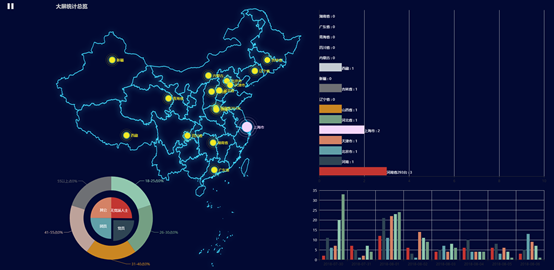
2. 引入ECharts以及地图相关json
ECharts 3 开始不再强制使用 AMD 的方式按需引入,代码里也不再内置 AMD 加载器。因此引入方式简单了很多,只需要像普通的 JavaScript 库一样用 script 标签引入。
<!DOCTYPE html>
<html>
<head>
 <meta charset="utf-8">
 <!-- 引入 ECharts 文件 -->
<script src="echarts/jquery-1.11.2.min.js"></script>
<script src="echarts/echarts.min.js"></script>
<script src="echarts/china.js"></script>
</head>
</html>
3. 界面布局
一个页面中布局多个图表有几个形式可以参考处理。
第一种:在网页创建多个div用定位的方式,多个画布。此方法声明多个echarts对象,不再过多介绍,除非特别个性需求,不推荐使用。
第二种:一个div一个画布,一个option,多个series,调整图形x/y的百分百来定位图形显示到界面上的位置。本文用这个方法。
第三种:与第二种基本一样,最大的不同是每个图标上都可以有一个标题,多个optioins;也是多个画布,但推荐这种。网址参考:http://gallery.echartsjs.com/editor.html?c=xBkXgRwejM
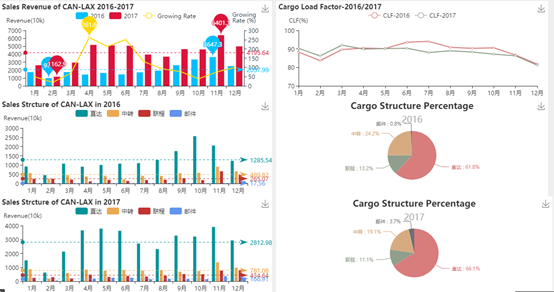
options = [
 // 第一个graph
{
 backgroundColor:'#FFFFFF',
 title: {
 text: 'Sales Revenue of CAN-LAX 2016-2017',
 textStyle:{
 fontSize:14
 }
 },

 tooltip: { // 提示框组件
 trigger: 'axis',
 axisPointer: { // 坐标轴指示器,坐标轴触发有效
 type: 'shadow' // 默认为直线,可选为:'line' | 'shadow'
 }
 },
 legend: {
 data: ['2016', '2017','Growing Rate'],
 top:'18'
 },
 grid: {
 left: '3%',
 right: '5%',
 bottom: '3%',
 containLabel: true,
 show: false // 网格边框是否显示,上和右边框
 },
 toolbox: {
 feature: {
 dataView: {show: false, readOnly: false}, // 数据试图是否在控件中显示
 //magicType: {show: true, type: ['stack', 'tiled']},
 //restore: {show: true},
 saveAsImage: {show: true}
 }
 },
 xAxis: {
 type: 'category',
 boundaryGap: true, // 坐标轴两边留白
 splitLine: { // 网格线 x轴对应的是否显示
 show: false
 },
 data: ['1月', '2月', '3月', '4月', '5月', '6月', '7月', '8月', '9月', '10月', '11月', '12月']
 },

 yAxis: [ // 双y坐标轴
 {
 name: 'Revenue(10k)',
 type: 'value',
 splitLine: { // 网格线 y轴对应的是否显示
 show: false
 },
 axisLabel: {
 formatter: '{value}'
 }
 },
 {
 name: 'Growing\nRate (%)',
 //nameLocation: 'start',
 splitLine: { // 网格线 y轴对应的是否显示
 show: false
 },
 min:0,
 max: 300, // growing rate upper limit
 type: 'value',
 //top:10,
 inverse: false,
 axisLine: {
 lineStyle: {
 color: '#2f4554'
 }
 }
 }],

 series: [
 {
 name:'2016',
 type:'bar',
 color:'#00BFFF',
 //stack: '总量',
 markPoint : {
 data : [
 {type : 'max', name : '最大值'},
 {type : 'min', name : '最小值'}
 ]
 },
 markLine : {
 data : [
 {type : 'average', name : '平均值'}
 ]
 },
 data:[1741.9, 977, 1742.2, 1431.1, 1636.2, 1447, 1711.7, 1921.2, 2609.6, 3332.6, 3647.3, 2498.1]
 },
 {
 name:'2017',
 type:'bar',
 color: '#DC143C',
 //stack: '总量',
 markPoint : {
 data : [
 {type : 'max', name : '最大值'},
 {type : 'min', name : '最小值'}
 ]
 },
 markLine : {
 data : [
 {type : 'average', name : '平均值'}
 ]
 },
 data:[2609, 1162.9, 2942.9, 5174.6, 5114.4, 5065.8, 3956.1, 3691.1, 4637.6, 4603.8, 6401.1, 4988.4]
 },
 {
 name:'Growing Rate',
 type:'line',
 yAxisIndex: 1, // yAxisIndex 1 表示第二个y轴,默认为0
 color: '#FFD700',
 //stack: '总量',
 markPoint : {
 data : [
 {type : 'max', name : '最大值'},
 //{type : 'min', name : '最小值'}
 ]
 },
 data:[49.8, 19, 68.9, 261.6, 212.6, 250.1, 131.1, 92.1, 77.7, 38.1, 75.5, 99.7]
 }
 ]
},

 // visualMap: { # 旁边会有 视觉映射组件
 // type: 'continuous',
 // dimension: 1,
 // text: ['High', 'Low'],
// inverse: true,
 // itemHeight: 200,
 // calculable: true,
 // min: -2,
// max: 6,
// top: 60,
 // left: 10,
 // inRange: {
 // colorLightness: [0.4, 0.8]
 //},
// outOfRange: {
 // color: '#bbb'
 // },
 // controller: {
 // inRange: {
 // color: '#01949B'
 //}
 // }
 //},

 //第2个graph
{
 backgroundColor:'#FFFFFF', // 背景色
 title: {
 text: 'Cargo Load Factor-2016/2017',
 textStyle:{
 fontSize:14,
 }
 },
 tooltip: {
 trigger: 'axis'
 },
 legend: {
 data:['CLF-2016','CLF-2017'],
 top:'18' // 距离容器顶端的距离
 },
 grid: {
 left: '3%',
 right: '4%',
 bottom: '3%',
 containLabel: true
 },
 toolbox: {
 feature: {
 dataView: {show: false, readOnly: false}, // 数据试图是否在控件中显示
 saveAsImage: {show:true}
 }
 },

 xAxis: {
 type: 'category',
 boundaryGap: false, // 坐标轴两边留白策略
 splitLine: { // 网格线 x轴对应的是否显示
 show: false
 },
 data: ['1月','2月','3月','4月','5月','6月','7月','8月','9月','10月','11月','12月']
 },

 yAxis: {
 type: 'value',
 name: 'CLF(%)',
 min: 70,
 max: 100,
 interval: 10,
 splitLine: { // 网格线 y轴对应的是否显示
 show: false
 }
 },

 series: [
 {
 name:'CLF-2016',
 type:'line',
 data:[88.29, 83.68, 89.64, 90.47, 90.21, 93.63, 94.07, 90.85, 90.32, 90.56, 86.69, 81.77]

 },
 {
 name:'CLF-2017',
 type:'line',
 data:[90.36, 86.21, 92.04, 89.91, 90.15, 90.38, 88.03, 88.99, 88.35, 87.18, 86.29, 81.23]

 }
 ]
},

 //第3个graph
{
 backgroundColor:'#FFFFFF',
 title: {
 text: 'Sales Strcture of CAN-LAX in 2016',
 //left:'center', // title位置
 textStyle:{
 fontSize:14,
 }
 },
 tooltip: {
 trigger: 'axis',
 axisPointer: { // 坐标轴指示器,坐标轴触发有效
 type: 'shadow' // 默认为直线,可选为:'line' | 'shadow'
 }
 },
 toolbox: {
 feature: {
 dataView: {show: false, readOnly: false}, // 数据试图是否在控件中显示
 //magicType: {show: true, type: ['stack', 'tiled']},
 //restore: {show: true},
 saveAsImage: {show: true}
 }
 },
 legend: {
 data: ['直达', '中转', '联程', '邮件'],
 top:'18'
 },
 grid: {
 left: '2%',
 right: '9%',
 bottom: '3%',
 containLabel: true,
 show: false // 网格边框是否显示,上和右边框
 },

 xAxis: [{
 type: 'category',
 splitLine: { // 网格线 x轴对应的是否显示
 show: false
 },
 data: ['1月','2月','3月','4月','5月','6月','7月','8月','9月','10月','11月','12月']
 }],

 yAxis: [{
 name: 'Revenue(10k)',
 type: 'value',
 splitLine: { // 网格线 y轴对应的是否显示
 show: false
 },
 axisLabel: {
 formatter: '{value}'
 },
 }],


 series: [{
 name: '直达',
 type: 'bar',
 itemStyle:{
 normal:{color:'#01949B'},
 },

 //markPoint : {
 //data : [
 //{type : 'max', name : '最大值'},
 //{type : 'min', name : '最小值'}
 //]
 //},

 markLine : {
 data : [
 {type : 'average', name : '平均值'}
 ]
 },

 data: [919, 455.7, 1074.8, 911.7, 1006.8, 1075.6, 1106.1, 1274.5, 1755.6, 2562.7, 2056.1, 1227.9]
 },
 {
 name: '中转',
 type: 'bar',
 itemStyle:{
 normal:{color:'#EBA954'},
 },
 //markPoint : {
 //data : [
 //{type : 'max', name : '最大值'},
 //{type : 'min', name : '最小值'}
 //]
 //},
 markLine : {
 data : [
 {type : 'average', name : '平均值'}
 ]
 },
 data: [567.1, 261.4, 456.8, 387, 419.2, 227, 417, 413.1, 564, 583, 915.9, 666.3]
 }, {
 name: '联程',
 type: 'bar',
 itemStyle:{
 normal:{color:'#C23531'},
 },
 //markPoint : {
 //data : [
 //{type : 'max', name : '最大值'},
 //{type : 'min', name : '最小值'}
 //]
 //},
 markLine : {
 data : [
 {type : 'average', name : '平均值'}
 ]
 },
 data: [255.9, 259.8, 210.5, 118.2, 196.5, 140.6, 188.6, 204.4, 290, 186.9, 661.3, 468.2]
 },{
 name: '邮件',
 type: 'bar',
 itemStyle:{
 normal:{color:'#6495ED'},
 },
 //markPoint : {
 //data : [
 //{type : 'max', name : '最大值'},
 //{type : 'min', name : '最小值'}
 //]
 //},
 markLine : {
 data : [
 {type : 'average', name : '平均值'}
 ]
 },
 data: [0, 0, 0, 14.2, 13.7, 3.8, 0, 29.2, 0, 0, 14, 135.8]
 }]
},


 //第4个graph
{
 backgroundColor:'#FFFFFF',
 title: {
 text: 'Cargo Structure Percentage',
 subtext: '2016',
 left: 'center',
 subtextStyle:{
 fontSize:18
 }
 },
 toolbox: {
 feature: {
 dataView: {show: false, readOnly: false}, // 数据试图是否在控件中显示
 //magicType: {show: true, type: ['stack', 'tiled']},
 //restore: {show: true},
 saveAsImage: {show: true}
 }
 },
 tooltip : {
 trigger: 'item',
 formatter: "{a} <br/>{b} : {c} ({d}%)"
 },
 legend: {
 // orient: 'vertical',
 // top: 'middle',
 bottom: 20,
 left: 'center',
 data: ['直达', '中转', '联程', '邮件'],
 show:false // legend 不显示
 },
 series : [
 {
 name:'Cargo Source',
 type: 'pie',
 avoidLabelOverlap: false,
 radius : '50%',
 center: ['50%', '58%'],
 selectedMode: 'single',
 label: {
 normal: {
 show: true,
 textStyle:{
 fontSize: '10',
 //fontWeight: 'bold'
 },
 formatter: '{b} : {d}%',
 position: 'outer'
 },
 emphasis: {
 show: true,
 textStyle: {
 fontSize: '30',
 fontWeight: 'bold'
 }
 }
 },
 labelLine: {
 normal: {
 show: true
 }
 },
 data:[
 {name: '直达', value: 61.8},
 {name: '联程', value: 13.2},
 {name: '中转', value: 24.2},
 {name: '邮件', value: 0.8}
 ],
 itemStyle: {
 emphasis: {
 shadowBlur: 10,
 shadowOffsetX: 0,
 shadowColor: 'rgba(0, 0, 0, 0.5)'
 }
 }
 }
 ]
},

 // 第5个graph
{
 backgroundColor:'#FFFFFF',
 title: {
 text: 'Sales Strcture of CAN-LAX in 2017',
 //left:'center', // title位置
 textStyle:{
 fontSize:14,
 }
 },
 tooltip: {
 trigger: 'axis',
 axisPointer: { // 坐标轴指示器,坐标轴触发有效
 type: 'shadow' // 默认为直线,可选为:'line' | 'shadow'
 }
 },
 toolbox: {
 feature: {
 dataView: {show: false, readOnly: false}, // 数据试图是否在控件中显示
 //magicType: {show: true, type: ['stack', 'tiled']},
 //restore: {show: true},
 saveAsImage: {show: true}
 }
 },
 legend: {
 data: ['直达', '中转', '联程', '邮件'],
 top:'18'
 },
 grid: {
 left: '2%',
 right: '9%',
 bottom: '3%',
 containLabel: true,
 show: false // 网格边框是否显示,上和右边框
 },

 xAxis: [{
 type: 'category',
 splitLine: { // 网格线 x轴对应的是否显示
 show: false
 },
 data: ['1月','2月','3月','4月','5月','6月','7月','8月','9月','10月','11月','12月']
 }],

 yAxis: [{
 name: 'Revenue(10k)',
 type: 'value',
 splitLine: { // 网格线 y轴对应的是否显示
 show: false
 },
 axisLabel: {
 formatter: '{value}'
 },
 }],


 series: [{
 name: '直达',
 type: 'bar',
 itemStyle:{
 normal:{color:'#01949B'},
 },

 //markPoint : {
 //data : [
 //{type : 'max', name : '最大值'},
 //{type : 'min', name : '最小值'}
 //]
 //},

 markLine : {
 data : [
 {type : 'average', name : '平均值'}
 ]
 },

 data: [1504.2, 622.8, 2132, 3668.6, 3797.3, 3632.8, 2716, 2320.6, 3288.1, 3220, 3911.4, 2942]
 },
 {
 name: '中转',
 type: 'bar',
 itemStyle:{
 normal:{color:'#EBA954'},
 },
 //markPoint : {
 //data : [
 //{type : 'max', name : '最大值'},
 //{type : 'min', name : '最小值'}
 //]
 //},
 markLine : {
 data : [
 {type : 'average', name : '平均值'}
 ]
 },
 data: [861.7, 196.6, 600.7, 836.2, 757.8, 804.2, 766.3, 797, 677.5, 734.2, 1363.5, 977.3]
 }, {
 name: '联程',
 type: 'bar',
 itemStyle:{
 normal:{color:'#C23531'},
 },
 //markPoint : {
 //data : [
 //{type : 'max', name : '最大值'},
 //{type : 'min', name : '最小值'}
 //]
 //},
 markLine : {
 data : [
 {type : 'average', name : '平均值'}
 ]
 },
 data: [240.6, 294.4, 202.6, 476.9, 308.3, 376.4, 334.7, 401, 514, 506.2, 766.2, 794.4]
 },{
 name: '邮件',
 type: 'bar',
 itemStyle:{
 normal:{color:'#6495ED'},
 },
 //markPoint : {
 //data : [
 //{type : 'max', name : '最大值'},
 //{type : 'min', name : '最小值'}
 //]
 //},
 markLine : {
 data : [
 {type : 'average', name : '平均值'}
 ]
 },
 data: [2.5, 49.1, 7.6, 192.9, 251, 252.3, 139.1, 172.5, 157.9, 143.4, 359.9, 274.7]
 }]
},

 //第6个graph
{
 backgroundColor:'#FFFFFF',
 title: {
 text: 'Cargo Structure Percentage',
 subtext: '2017',
 left: 'center',
 subtextStyle:{
 fontSize:18
 }
 },
 toolbox: {
 feature: {
 dataView: {show: false, readOnly: false}, // 数据试图是否在控件中显示
 //magicType: {show: true, type: ['stack', 'tiled']},
 //restore: {show: true},
 saveAsImage: {show: true}
 }
 },
 tooltip : {
 trigger: 'item',
 formatter: "{a} <br/>{b} : {c} ({d}%)"
 },
 legend: {
 // orient: 'vertical',
 // top: 'middle',
 bottom: 20,
 left: 'center',
 data: ['直达', '中转', '联程', '邮件'],
 show:false // legend 不显示
 },
 series : [
 {
 name:'Cargo Source',
 type: 'pie',
 avoidLabelOverlap: false,
 radius : '50%',
 center: ['50%', '58%'],
 selectedMode: 'single',
 label: {
 normal: {
 show: true,
 textStyle:{
 fontSize: '10',
 //fontWeight: 'bold'
 },
 formatter: '{b} : {d}%',
 position: 'outer'
 },
 emphasis: {
 show: true,
 textStyle: {
 fontSize: '30',
 fontWeight: 'bold'
 }
 }
 },
 labelLine: {
 normal: {
 show: true
 }
 },
 data:[
 {name: '直达', value: 66.1},
 {name: '联程', value: 11.1},
 {name: '中转', value: 19.1},
 {name: '邮件', value: 3.7}
 ],
 itemStyle: {
 emphasis: {
 shadowBlur: 10,
 shadowOffsetX: 0,
 shadowColor: 'rgba(0, 0, 0, 0.5)'
 }
 }
 }
 ]
}

];
因为,刚开始做没有发现第三种方式,所以暂时用的第二种方式,不太好控制位置和增减图表。如果再让我做我会选择第三种,感觉更灵活一些。以上是我做整合的时候发现在的一个页面多个图表几个实现方式,可能还有更好的,期待你的留言。
页面静态代码很简单,下面来看网页代码布局:
<!DOCTYPE html>
<html xmlns="http://www.w3.org/1999/xhtml">
<head runat="server">
 <meta http-equiv="Content-Type" content="text/html; charset=utf-8" />
 <title>综合统计 - 大屏</title>
 <link rel="stylesheet" type="text/css" href="skin/icon/iconfont.css" />
 <link rel="stylesheet" type="text/css" href="skin/default/style.css" />
 <script src="../scripts/jquery/jquery-1.11.2.min.js"></script>
 <script src="js/common.js"></script>
 <script src="../scripts/echart/echarts.min.js"></script>
 <script src="../scripts/echart/china.js"></script>
 <style>
 #btnSet{padding:0;background-color:#020933;box-sizing:border-box;position:absolute;left:30px;top:24px;z-index:9999}
 .btnPlay{height:20px;border-style:solid;border-width:10px 0 10px 20px;border-color:transparent transparent transparent #fff;transition:all .5s ease}
 .btnPause{width:20px;height:20px;border-style:double;border-width:0 0 0 20px;border-color:#fff}
 </style>
</head>
<body class="">
 <form id="form1" runat="server">
 <input type="hidden" id="start" name="start" value="0" />
 <input type="button" id="btnSet" class="btnPause" title="点击停止" />
 <div id="mapContainer" class="mapContainer" style="background: #000000;"></div>
 </form>
</body>
</html>
4. js实现图形布局
<script>
 /**
地图级联
*/
 var mapContainer = document.getElementById('mapContainer');
 //用于使chart自适应高度和宽度,通过窗体高宽计算容器高宽
 var resizeWorldMapContainer = function () {
 $("#mapContainer").width($(window).width());
 $("#mapContainer").height($(window).height());
 //$("#mapContainer").css("width", $(window).width()+"px");
 //$("#mapContainer").css("height", $(window).height()+"px");
 };
 // 基于准备好的dom,初始化echarts实例
 var myChart = echarts.init(mapContainer);

 var geoCoordMap = { '河南省': [113.664496, 34.817821], '河南': [113.75783, 34.502434], '北京市': [116.403694, 39.915378], '天津市': [117.216837, 39.142415], '上海市': [121.479662, 31.234329], '河北省': [114.494585, 38.129532], '山西省': [112.569095, 37.908919], '辽宁省': [123.445046, 41.806913], '吉林省': [126.582519, 43.86473], '新疆': [87.559985, 43.879367], '西藏': [91.160816, 29.653148], '内蒙古': [111.771822, 40.93481], '四川省': [106.492302, 29.601285], '青海省': [101.73138, 36.627027], '广东省': [113.254301, 23.129454], '湖南省': [112.953187, 28.265007] };
 var data = [{ name: '河南省', value: 3 }, { name: '河南', value: 1 }, { name: '北京市', value: 1 }, { name: '天津市', value: 1 }, { name: '上海市', value: 2 }, { name: '河北省', value: 1 }, { name: '山西省', value: 1 }, { name: '辽宁省', value: 0 }, { name: '吉林省', value: 1 }, { name: '新疆', value: 0 }, { name: '西藏', value: 1 }, { name: '内蒙古', value: 0 }, { name: '四川省', value: 0 }, { name: '青海省', value: 0 }, { name: '广东省', value: 0 }, { name: '湖南省', value: 0 }];
 var convertData = function (data) {
 var res = [];
 for (var i = 0; i < data.length; i++) {
 var geoCoord = geoCoordMap[data[i].name];
 if (geoCoord) {
 res.push({
 name: data[i].name,
 value: geoCoord.concat(data[i].value)
 });
 }
 }
 return res;
 };
 var uploadedDataURL = "../scripts/echart/china.json";
 myChart.showLoading();
 $.getJSON(uploadedDataURL, function (geoJson) {
 echarts.registerMap('zhengzhou', geoJson);
 myChart.hideLoading();

 option = {
 backgroundColor: '#020933',
 title: {
 top: 20,
 left: 190,
 text: '大屏统计总览',
 subtext: '',
 x: 'left',
 textStyle: {
 color: '#ccc'
 }
 },
 tooltip: {
 trigger: 'axis',
 axisPointer: { // 坐标轴指示器,坐标轴触发有效
 type: 'shadow' // 默认为直线,可选为:'line' | 'shadow'
 },
 formatter: function (params) {
 if (typeof (params.value)[2] == "undefined") {
 //return params.name + ' : ' + params.value;
 } else {//只有数据不为空才显示
 return params.name + ' : ' + params.value[2];
 }
 }
 },
 visualMap: {
 show: false,
 min: 0,
 max: 500,
 left: 'left',
 top: 'bottom',
 text: ['高', '低'], // 文本,默认为数值文本
 calculable: true,
 seriesIndex: [1],
 inRange: {
 },
 dimension: 0
 },
 //布局s
 grid: [
 { x: '57%', y: '5%', width: '40%', height: '60%' },
 { x: '57%', y: '70%', width: '40%', height: '25%' }
 ],
 xAxis: [{
 title: "asdf",
 gridIndex: 0,
 type: 'value',
 max: 10,//x轴刻度
 axisLabel: {
 show: true,
 },
 splitLine: {
 show: true
 }
 }, {
 gridIndex: 1,
 type: 'category',
 axisLabel: {
 show: true,
 },
 splitLine: {
 show: true
 }, data: ['2018-07-30', '2018-07-31', '2018-08-01', '2018-08-02', '2018-08-03', '2018-08-04', '2018-08-05', '2018-08-06']
 }],
 yAxis: [{
 gridIndex: 0,
 type: 'category',
 axisLabel: {
 show: true,
 textStyle: {
 color: '#ddd'
 }
 }
 }, {
 gridIndex: 1,
 type: 'value',
 axisLabel: {
 show: true,
 textStyle: {
 color: '#ddd'
 }
 }
 }],
 //布局e
 geo: {
 show: true,
 map: 'zhengzhou',
 label: {
 normal: {
 show: false
 },
 emphasis: {
 show: false,
 }
 },
 roam: false,//是否开启鼠标缩放和平移漫游
 itemStyle: {
 normal: {
 areaColor: 'transparent',
 borderColor: '#3fdaff',
 borderWidth: 2,
 shadowColor: 'rgba(63, 218, 255, 0.5)',
 shadowBlur: 30
 },
 emphasis: {
 areaColor: '#2B91B7',
 }
 }
 },
 //调整显示级别
 layoutCenter: ['32%', '52%'],
 layoutSize: 900,

 series: [
 {
 name: '地图台站',
 type: 'effectScatter',
 coordinateSystem: 'geo',
 data: convertData(data.sort(function (a, b) {
 return b.value - a.value;
 }).slice(0, 5)),
 symbolSize: function (val) {
 //return val[2] / 10;//地图闪动
 return 20;
 },
 showEffectOn: 'render',
 rippleEffect: {
 brushType: 'stroke'
 },
 hoverAnimation: true,
 label: {
 normal: {
 formatter: '{b}',
 position: 'right',
 show: true
 }
 },
 itemStyle: {
 normal: {
 color: '#F4E925',
 shadowBlur: 10,
 shadowColor: '#05C3F9'
 }
 },
 zlevel: 1
 }, {
 name: '政治面貌',
 type: 'pie',
 z: 2,
 color: ['#c23531', '#2f4554', '#61a0a8', '#d48265', '#91c7ae', '#749f83', '#ca8622', '#bda29a', '#6e7074', '#546570', '#c4ccd3'],
 selectedMode: 'single',
 radius: [0, '15%'],
 center: ['20%', '80%'],
 label: {
 normal: {
 position: 'inner'
 }
 },
 labelLine: {
 normal: {
 show: false
 }
 },
 //显示series中信息,提示框组件
 tooltip: {
 trigger: 'item',
 formatter: "{a} <br/>{b} : {c} ({d}%)"
 },
 data: [{ value: 2, name: '无党派人士' }, { value: 4, name: '党员', selected: true }, { value: 5, name: '团员' }, { value: 1, name: '其它' }]
 },
 {
 name: '年龄占比',
 type: 'pie',
 z: 2,
 // 全局调色盘。
 color: ['#c23531', '#2f4554', '#61a0a8', '#d48265', '#91c7ae', '#749f83', '#ca8622', '#bda29a', '#6e7074', '#546570', '#c4ccd3'],
 radius: ['20%', '30%'],
 center: ['20%', '80%'],
 label: { formatter: "{b}占{d}%" },
 itemStyle: { //itemStyle有正常显示:normal,有鼠标hover的高亮显示:emphasis
 emphasis: { //normal显示阴影,与shadow有关的都是阴影的设置
 shadowBlur: 10, //阴影大小
 shadowOffsetX: 0, //阴影水平方向上的偏移
 shadowColor: 'rgba(0, 0, 0, 0.5)' //阴影颜色
 }
 },
 //显示series中信息,提示框组件
 tooltip: {
 trigger: 'item',
 formatter: "{a} <br/>{b} : {c} ({d}%)"
 },
 data: [{ value: 2, name: '18-25' }, { value: 8, name: '26-30' }, { value: 2, name: '31-40' }, { value: 0, name: '41-55' }, { value: 12, name: '55以上' }]
 }
 , {
 id: 'bar',
 name: '台站排名',
 type: 'bar',
 xAxisIndex: 0,
 yAxisIndex: 0,
 label: {
 normal: {
 show: true,
 position: ["100%", "40%"],
 color: "#ffffff",
 formatter: "{b} : {c}"

 }
 },
 tooltip: {
 trigger: 'item',
 formatter: "{b} : {c}"
 },
 itemStyle: {
 //每个柱子的颜色即为colorList数组里的每一项,如果柱子数目多于colorList的长度,则柱子颜色循环使用该数组
 color: function (params) {
 var colorList = ['#c23531', '#2f4554', '#61a0a8', '#d48265', '#91c7ae', '#749f83', '#ca8622', '#bda29a', '#6e7074', '#546570', '#c4ccd3'];
 return colorList[params.dataIndex];
 }
 },
 z: 2,
 data: [{ value: 3, name: '河南省' }, { value: 1, name: '河南' }, { value: 1, name: '北京市' }, { value: 1, name: '天津市' }, { value: 2, name: '上海市' }, { value: 1, name: '河北省' }, { value: 1, name: '山西省' }, { value: 0, name: '辽宁省' }, { value: 1, name: '吉林省' }, { value: 0, name: '新疆' }, { value: 1, name: '西藏' }, { value: 0, name: '内蒙古' }, { value: 0, name: '四川省' }, { value: 0, name: '青海省' }, { value: 0, name: '广东省' }, { value: 0, name: '湖南省' }]
 },
 {
 name: '请假',
 type: 'bar',
 xAxisIndex: 1,
 yAxisIndex: 1,
 tooltip: {
 trigger: 'item',
 formatter: "{a} : {c}"
 },
 data: [1, 3, 2, 4, 1, 4, 3]
 },
 {
 name: '迟到',
 type: 'bar',
 xAxisIndex: 1,
 yAxisIndex: 1,
 tooltip: {
 trigger: 'item',
 formatter: "{a} : {c}"
 },
 data: [1, 2, 3, 4, 3, 2, 2]
 },
 {
 name: '早退',
 type: 'bar',
 xAxisIndex: 1,
 yAxisIndex: 1,
 tooltip: {
 trigger: 'item',
 formatter: "{a} : {c}"
 },
 data: [1, 2, 3, 4, 3, 2, 4]
 },
 {
 name: '调休',
 type: 'bar',
 xAxisIndex: 1,
 yAxisIndex: 1,
 tooltip: {
 trigger: 'item',
 formatter: "{a} : {c}"
 },
 data: [1, 3, 2, 4, 1, 4, 2]
 },
 {
 name: '加班',
 type: 'bar',
 xAxisIndex: 1,
 yAxisIndex: 1,
 tooltip: {
 trigger: 'item',
 formatter: "{a} : {c}"
 },
 data: [1, 3, 2, 4, 1, 4, 2]
 },
 {
 name: '旷工',
 type: 'bar',
 xAxisIndex: 1,
 yAxisIndex: 1,
 tooltip: {
 trigger: 'item',
 formatter: "{a} : {c}"
 },
 data: [1, 3, 2, 4, 1, 4, 2]
 }


 ]
 };
 myChart.setOption(option);

 //重置容器高宽
 resizeWorldMapContainer();
 myChart.resize();
 redoMethod();

 //用于使chart自适应高度和宽度
 window.onresize = function () {
 //重置容器高宽
 resizeWorldMapContainer();
 myChart.resize();
 };
 //循环做某些事情
 myChart.on('click', function (params) {
 if (params.data) {
 //var index = JSON.stringify(data).indexOf(params.data.name);//结果:index=1
 //if (index >= 0) {//只对地图点击事件做判断
 //点击某某台,考勤自动变更
 //1.点击地图变更2.点击排行变更
 if (params.seriesIndex == 0 || params.seriesIndex == 3) {
 if ($("#btnSet").attr("title") == "点击停止") {
 $("#btnSet").trigger('click');
 }
 redoMethod(params.data.name);
 }
 //if (params.seriesIndex==3) {
 // alert(params.data.name);
 // //if ($("#btnSet").attr("title") == "点击停止") {
 // // $("#btnSet").trigger('click');
 // //}
 // //redoMethod(params.data.name);
 //}
 }
 });
 });

</script>
5. 定时循环jquery实现
地图上的散点闪动5秒切换一次,所有地图信息参与轮询。具体js代码如下:
<script>
 /**
* 调用本地的ashx
* @file 文件名
* @param get参数 (a=1&b=2&c=3)
* @fn 回调函数 : 服务端返回 result=xxx; 回调函数直接处理result变量。
*/
$.ashx = function (file, param, fn, er) {
 var sUrl = file;
 $.ajax({
 type: "GET",
 contentType: "application/json",
 cache: false,
 url: sUrl,
 data: param,
 dataType: "json",
 success: fn,
 error: er
 });
};
 var globalIndex = 0;
 //地图点击时间
 function redoMethod(deptname) {

 if (!deptname) {
 deptname = data[globalIndex].name;
 globalIndex++;
 if (globalIndex == data.length) {
 globalIndex = 0;
 }
 }
 //alert(name);
 $.ashx("ajax的url地址", "action=xx&deptname=" + deptname, function (result) {
 if (result) {
 if (result.results == "") {
 return;
 }
 //debugger;
 //alert(result.results.politcal);
 var option = myChart.getOption();
 //动态改变图形
 option.series[0].data = convertData(data);//地图
 option.series[0].symbolSize = function (val, params) {//标记的大小
 //alert(name.name);
 if (deptname == params.name) {
 return 35;//地图闪动
 } else {
 return 20;
 }
 };
 option.series[0].itemStyle.color = function (params) {
 if (deptname == params.name) {
 return "rgba(245, 214, 251, 1)";
 } else {
 return "#F4E925";
 }
 };
 option.series[1].data = result.results[0].politcal;//政治面貌
 option.series[2].data = result.results[1].ageScale;//年龄占比
 option.series[3].itemStyle.color = function (params) {
 if (deptname == params.name) {
 return "rgba(245, 214, 251, 1)";
 } else {
 var colorList = ['#c23531', '#2f4554', '#61a0a8', '#d48265', '#91c7ae', '#749f83', '#ca8622', '#bda29a', '#6e7074', '#546570', '#c4ccd3'];
 return colorList[params.dataIndex];
 }
 }

 option.series[4].data = [2, 7, 12, 6, 4, 6, 6, 3];//请假
 option.series[5].data = [11, 5, 21, 3, 5, 10, 8, 5];//迟到
 option.series[6].data = [6, 1, 11, 1, 7, 4, 3, 13];//早退
 option.series[7].data = [7, 2, 22, 14, 4, 4, 6, 9];//调休
 option.series[8].data = [20, 7, 23, 11, 8, 4, 4, 7];//加班
 option.series[9].data = [33, 4, 24, 9, 6, 4, 1, 1];//旷工

 myChart.setOption(option);
 }
 }, function (er) {
 //alert("请求失败");
 });
 }
 $(function () {
 //定时循环
 var interval = setInterval("redoMethod()", 5000);//每隔一秒执行一次redoMethod()
 //假如有两个按钮:继续、暂停
 $("#btnSet").click(function () {//点击暂停按钮
 if (interval) {
 clearInterval(interval);
 interval = null;
 }
 if ($(this).attr("title") == "点击停止") {
 $(this).attr("title", "点击开始");
 $(this).attr("class", "btnPlay");
 } else {
 $(this).attr("title", "点击停止");
 $(this).attr("class", "btnPause");
 interval = setInterval("redoMethod()", 5000);
 }

 });
 });
</script>
6. 总结
以上就是我在处理同页面多图形统计且有级联关系处理时的思路及采坑代码,文中代码均是从项目中复制出来的,完整率99.99%,代码略乱,开发中整理的思路注释什么的未处理,见谅。
好了,以上就是这篇文章的全部内容了,希望本文的内容对大家的学习或者工作具有一定的参考学习价值,如果有疑问大家可以留言交流,谢谢大家对脚本之家的支持。