这里的微信小程序动态加载是以按钮为例,主页面点击不同的按钮进入不同的子页面中,根据主页面的title来动态加载子页面按钮的数量以及值。
效果图:
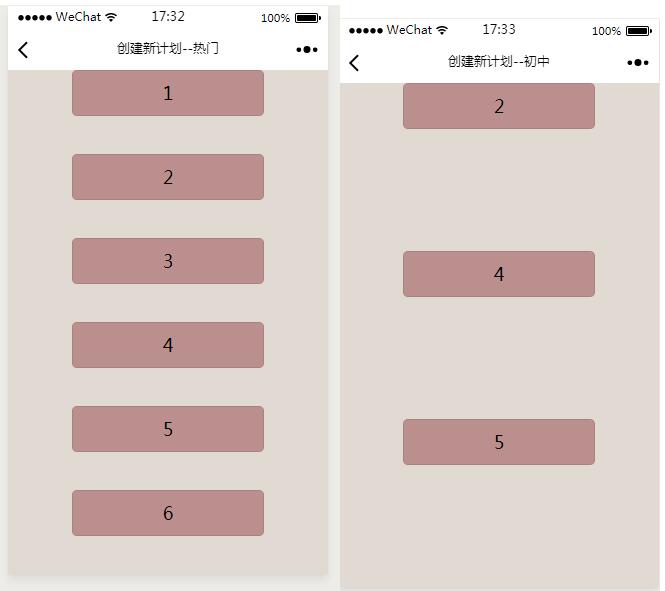
wxml文件(注意wx:key="item"要写,不然它会有警告):
<!--pages/plan/plans/plans.wxml-->
<view class="className" style="background-color: rgb(225, 218, 211); height:{{className_height}}px" wx:for="{{array}}" wx:key="item">
 <button class="items" id="{{stv.id[index]}}">{{item.name}}</button>
</view>
这里起关键作用的是wx:for,这里是循环。
wxss文件:
/* pages/plan/plans/plans.wxss */
.items {
 background-color: rosybrown;
 width:60%;
}
js文件:
// pages/plan/hot/hot.js

Page({
 data: {
 },
 onLoad: function (options) {
 var that = this;
 var arr = new Array();
 if (options.title == "热门") {
 var location1 = { name: "1" };
 var location2 = { name: "2" };
 var location3 = { name: "3" };
 var location4 = { name: "4" };
 var location5 = { name: "5" };
 var location6 = { name: "6" };
 arr.push(location1);
 arr.push(location2);
 arr.push(location3);
 arr.push(location4);
 arr.push(location5);
 arr.push(location6);
 console.log("OK");
 } else {
 var location1 = { name: "2" };
 var location2 = { name: "4" };
 var location3 = { name: "5" };
 arr.push(location1);
 arr.push(location2);
 arr.push(location3);
 }
 wx.setNavigationBarTitle({title:'创建新计划--'+options.title});
 wx.getSystemInfo({
 success: function (res) {
 that.setData({
 //view
 className_height: res.windowHeight / arr.length,
 //btn
 array: arr,
 })
 }
 })
 },
})
以上就是本文的全部内容,希望对大家的学习有所帮助,也希望大家多多支持脚本之家。