一、功能描述:
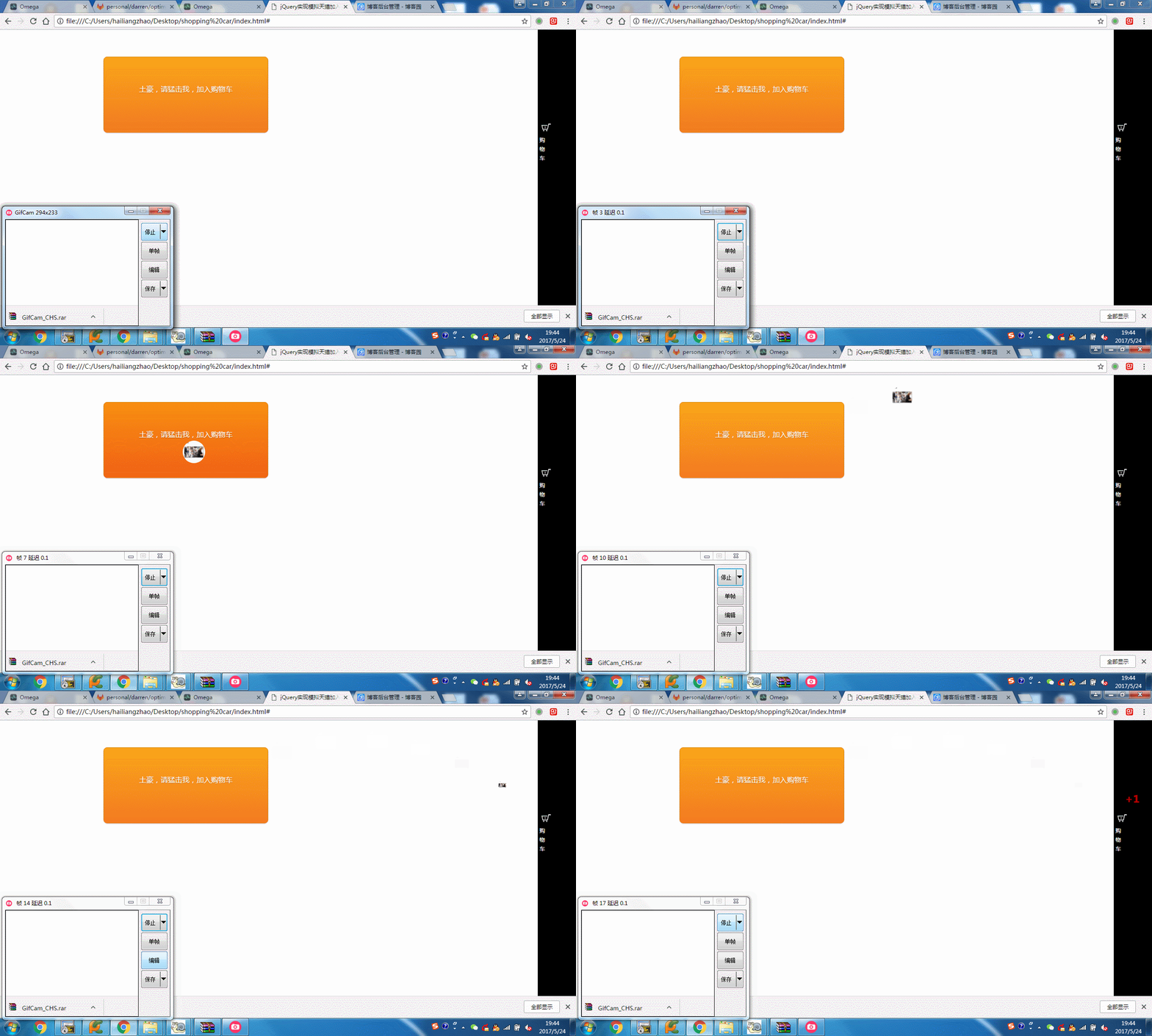
1、点击购买按钮,模拟抛物线将物品弹到购物车里;
2、购物车添加物品后,显示+1动画;
效果图如下:
实现如下:
1、导入jquery相关的包:
<script type="text/javascript" src="jquery-2.1.1.min.js"></script>
<script src="jquery.fly.min.js"></script>
2、html文件内容:
<!DOCTYPE HTML>
<html>
<head>
<meta charset="utf-8">
<meta name="viewport" content="width=device-width, initial-scale=1, maximum-scale=1">
<title>jQuery实现模拟天猫加入购物车飞入动画效果</title>
<meta name="keywords" content="jquery,购物车" />
<body>
<div id="main">
 <div class="demo">
 <div class="box orange button addcar">
 <div style="padding-top:55px">
 土豪,请猛击我,加入购物车
 </div>
 </div>
 </div>
 </div>
 <div class="m-sidebar">
 <div class="cart">
 <i id="end"></i>
 <span>购物车</span>
 </div>
 </div>
</div>
</body>
3、css样式:
<style type="text/css">
.demo{width:820px; margin:60px auto 10px auto}
.m-sidebar{position: fixed;top: 0;right: 0;background: #000;z-index: 2000;width: 85px;height: 100%;font-size: 12px;color: #fff;}
.cart{color: #fff;text-align:center;line-height: 20px;padding: 200px 0 0 0px;}
.cart span{display:block;width:20px;margin:10 0 0 0;}
.cart i{width:50px;height:35px;display:block; background:url(car.png) no-repeat;}
#msg{position:fixed; top:300px; right:35px; z-index:10000; width:1px; height:52px; line-height:52px; font-size:20px; text-align:center; color:#fff; background:#360; display:none}
.box{width:300px; height:150px; border:1px solid #e0e0e0; text-align:center}
.u-flyer{display: block;width: 50px;height: 50px;border-radius: 50px;position: fixed;z-index: 9999;}
.button {
 display: inline-block;
 outline: none;
 cursor: pointer;
 text-align: center;
 text-decoration: none;
 font: 16px/100% 'Microsoft yahei',Arial, Helvetica, sans-serif;
 padding: .5em 2em .55em;
 text-shadow: 0 1px 1px rgba(0,0,0,.3);
 -webkit-border-radius: .5em;
 -moz-border-radius: .5em;
 border-radius: .5em;
 -webkit-box-shadow: 0 1px 2px rgba(0,0,0,.2);
 -moz-box-shadow: 0 1px 2px rgba(0,0,0,.2);
 box-shadow: 0 1px 2px rgba(0,0,0,.2);
}
.button:hover {
 text-decoration: none;
}
.button:active {
 position: relative;
 top: 1px;
}
/* orange */
.orange {
 color: #fef4e9;
 border: solid 1px #da7c0c;
 background: #f78d1d;
 background: -webkit-gradient(linear, left top, left bottom, from(#faa51a), to(#f47a20));
 background: -moz-linear-gradient(top, #faa51a, #f47a20);
 filter: progid:DXImageTransform.Microsoft.gradient(startColorstr='#faa51a', endColorstr='#f47a20');
}
.orange:hover {
 background: #f47c20;
 background: -webkit-gradient(linear, left top, left bottom, from(#f88e11), to(#f06015));
 background: -moz-linear-gradient(top, #f88e11, #f06015);
 filter: progid:DXImageTransform.Microsoft.gradient(startColorstr='#f88e11', endColorstr='#f06015');
}
.orange:active {
 color: #fcd3a5;
 background: -webkit-gradient(linear, left top, left bottom, from(#f47a20), to(#faa51a));
 background: -moz-linear-gradient(top, #f47a20, #faa51a);
 filter: progid:DXImageTransform.Microsoft.gradient(startColorstr='#f47a20', endColorstr='#faa51a');
}
4、核心的JQuery代码:
<script>
//实现购物车+1动画效果
(function ($) {
 $.extend({
 tipsBox: function (options) {
 options = $.extend({
 obj: null, //jq对象,要在那个html标签上显示
 str: "+1", //字符串,要显示的内容
 startSize: "18px", //动画开始的文字大小
 endSize: "38px", //动画结束的文字大小
 interval: 600, //动画时间间隔
 color: "red", //文字颜色
 callback: function () { } //回调函数
 }, options);
 $("body").append("<span class='num'>" + options.str + "</span>");
 var box = $(".num");
 var left = options.obj.offset().left + options.obj.width() / 2;
 var top = options.obj.offset().top - options.obj.height();
 box.css({
 "position": "absolute",
 "left": left + "px",
 "top": top + "px",
 "z-index": 9999,
 "font-size": options.startSize,
 "line-height": options.endSize,
 "color": options.color
 });
 box.animate({
 "font-size": options.endSize,
 "opacity": "0",
 "top": top - parseInt(options.endSize) + "px"
 }, options.interval, function () {
 box.remove();
 options.callback();
 });
 }
 });
})(jQuery);
function niceIn(prop){
 prop.find('i').addClass('niceIn');
 setTimeout(function(){
 prop.find('i').removeClass('niceIn');
 },1000);
}
//实现抛物线动画功能
$(function() {
 var offset = $("#end").offset();
 $(".addcar").click(function(event){
 var addcar = $(this);
 var img = "images/lg.jpg";
 var flyer = $('<img class="u-flyer" src="'+img+'">');
 flyer.fly({
 start: {
 left: event.pageX,
 top: event.pageY
 },
 end: {
 left: offset.left+10,
 top: offset.top+10,
 width: 0,
 height: 0
 },
 onEnd: function(){
 $.tipsBox({
 obj: $("#end"),
 str: "<b style='font-family:Microsoft YaHei;'>+1</b>",
 callback: function () {
 }
 });
 niceIn($("#end"));
 }
 });
 });
});
</script>
以上所述是小编给大家介绍的jQuery模拟实现天猫购物车动画效果实例代码,希望对大家有所帮助,如果大家有任何疑问请给我留言,小编会及时回复大家的。在此也非常感谢大家对脚本之家网站的支持!