本文介绍了angular动态删除ng-repaeat添加的dom节点的方法,分享给大家供大家参考,具体如下:
通过点击删除按钮删除数据库信息以及当前行
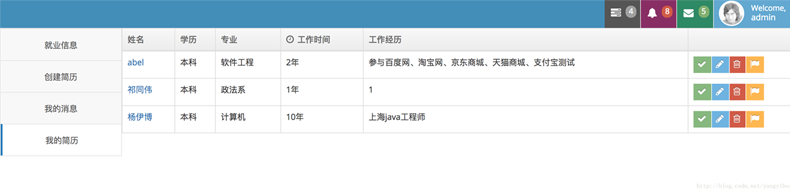
html代码如下:
<div class="row">
 <div class="col-xs-12">
 <!-- PAGE CONTENT BEGINS -->
 <div class="row">
 <div class="col-xs-12">
 <table id="simple-table" class="table table-bordered table-hover">
 <thead>
 <tr>
 <th>姓名</th>
 <th>学历</th>
 <th class="hidden-480">专业</th>

 <th>
 <i class="ace-icon fa fa-clock-o bigger-110 hidden-480"></i>
 工作时间
 </th>
 <th class="hidden-480">工作经历</th>

 <th></th>
 </tr>
 </thead>

 <tbody>
 <tr ng-repeat="x in jl" class="hang">//通过ng-repeat迭代创建dom
 <td>
 <a href="#" rel="external nofollow" rel="external nofollow" rel="external nofollow" rel="external nofollow" >{{x.name}}</a>
 </td>
 <td>{{x.education}}</td>
 <td class="hidden-480">{{x.major}}</td>
 <td>{{x.workYear+'年'}}</td>

 <td class="hidden-480">
 {{x.workExperience}}
 </td>

 <td>
 <div class="hidden-sm hidden-xs btn-group">
 <button class="btn btn-xs btn-success">
 <i class="ace-icon fa fa-check bigger-120"></i>
 </button>

 <button class="btn btn-xs btn-info">
 <i class="ace-icon fa fa-pencil bigger-120"></i>
 </button>

 <button class="btn btn-xs btn-danger" ng-click="_delete($index)">
 <i class="ace-icon fa fa-trash-o bigger-120"></i>
 </button>

 <button class="btn btn-xs btn-warning">
 <i class="ace-icon fa fa-flag bigger-120"></i>
 </button>
 </div>

 <div class="hidden-md hidden-lg">
 <div class="inline pos-rel">
 <button class="btn btn-minier btn-primary dropdown-toggle" data-toggle="dropdown" data-position="auto">
 <i class="ace-icon fa fa-cog icon-only bigger-110"></i>
 </button>

 <ul class="dropdown-menu dropdown-only-icon dropdown-yellow dropdown-menu-right dropdown-caret dropdown-close">
 <li>
 <a href="#" rel="external nofollow" rel="external nofollow" rel="external nofollow" rel="external nofollow" class="tooltip-info" data-rel="tooltip" title="View">
 <span class="blue">
 <i class="ace-icon fa fa-search-plus bigger-120"></i>
 </span>
 </a>
 </li>

 <li>
 <a href="#" rel="external nofollow" rel="external nofollow" rel="external nofollow" rel="external nofollow" class="tooltip-success" data-rel="tooltip" title="Edit">
 <span class="green">
 <i class="ace-icon fa fa-pencil-square-o bigger-120"></i>
 </span>
 </a>
 </li>

 <li>
 <a href="#" rel="external nofollow" rel="external nofollow" rel="external nofollow" rel="external nofollow" class="tooltip-error" data-rel="tooltip" title="Delete">
 <span class="red">
 <i class="ace-icon fa fa-trash-o bigger-120"></i>
 </span>
 </a>
 </li>
 </ul>
 </div>
 </div>
 </td>
 </tr>
 </tbody>
 </table>
 </div><!-- /.span -->
 </div><!-- /.row -->

 <!-- PAGE CONTENT ENDS -->
 </div><!-- /.col -->
</div>
<!-- /.row -->
js代码如下:
angular.controller('tables',function ($scope,$http) {
 $http({
 method: 'GET',
 url:'resumes/myResume/'+USER.id
 }).then(function success(rep) {
 $scope.jl=rep.data;
 });

 $scope._delete=function (idx) {
 $scope.id=$scope.jl[idx].id;
 $http({
 method:'DELETE',
 url:'resumes/'+$scope.id
 }).then(function success(rep) {
 $scope.jl.splice(idx, 1);//截取数组,删除当前行
 });
 }
});
以上就是本文的全部内容,希望对大家的学习有所帮助,也希望大家多多支持脚本之家。