微信小程序日历选择器插件点击日历日期可以获取到年月日,具体内容如下
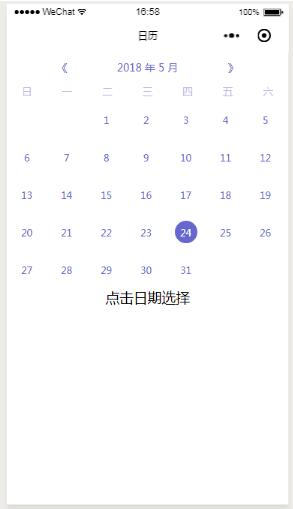
wxml
<view class="canlendarBgView">
 <view class="canlendarView">
 <view class="canlendarTopView">
 <view class="leftBgView" bindtap="handleCalendar" data-handle="prev">
 <view class="leftView">《</view>
 </view>
 <view class="centerView">{{cur_year || "--"}} 年 {{cur_month || "--"}} 月</view>
 <view class="rightBgView" bindtap="handleCalendar" data-handle="next">
 <view class="rightView">》</view>
 </view>
 </view>
 <view class="weekBgView">
 <view class="weekView" wx:for="{{weeks_ch}}" wx:key="{{index}}" data-idx="{{index}}">{{item}}</view>
 </view>
 <view class="dateBgView">
 <view wx:if="{{hasEmptyGrid}}" class="dateEmptyView" wx:for="{{empytGrids}}" wx:key="{{index}}" data-idx="{{index}}">
 </view>
 <view class="dateView" wx:for="{{days}}" wx:key="{{index}}" data-idx="{{index}}" bindtap="dateSelectAction">
 <view class="datesView {{index == todayIndex ? 'dateSelectView' : ''}}">{{item}}</view>
 </view>
 </view>
 </view>
 <view>点击日期选择</view>
</view>
js
//index.js
//获取应用实例
Page({
 data: {
 hasEmptyGrid: false,
 cur_year: '',
 cur_month: '',
 },
 onLoad(options) {
 this.setNowDate();
 },

 dateSelectAction: function (e) {
 var cur_day = e.currentTarget.dataset.idx;
 this.setData({
 todayIndex: cur_day
 })
 console.log(`点击的日期:${this.data.cur_year}年${this.data.cur_month}月${cur_day + 1}日`);
 },

 setNowDate: function () {
 const date = new Date();
 const cur_year = date.getFullYear();
 const cur_month = date.getMonth() + 1;
 const todayIndex = date.getDate() - 1;
 console.log(`日期:${todayIndex}`)
 const weeks_ch = ['日', '一', '二', '三', '四', '五', '六'];
 this.calculateEmptyGrids(cur_year, cur_month);
 this.calculateDays(cur_year, cur_month);
 this.setData({
 cur_year: cur_year,
 cur_month: cur_month,
 weeks_ch,
 todayIndex,
 })
 },

 getThisMonthDays(year, month) {
 return new Date(year, month, 0).getDate();
 },
 getFirstDayOfWeek(year, month) {
 return new Date(Date.UTC(year, month - 1, 1)).getDay();
 },
 calculateEmptyGrids(year, month) {
 const firstDayOfWeek = this.getFirstDayOfWeek(year, month);
 let empytGrids = [];
 if (firstDayOfWeek > 0) {
 for (let i = 0; i < firstDayOfWeek; i++) {
 empytGrids.push(i);
 }
 this.setData({
 hasEmptyGrid: true,
 empytGrids
 });
 } else {
 this.setData({
 hasEmptyGrid: false,
 empytGrids: []
 });
 }
 },
 calculateDays(year, month) {
 let days = [];

 const thisMonthDays = this.getThisMonthDays(year, month);

 for (let i = 1; i <= thisMonthDays; i++) {
 days.push(i);
 }

 this.setData({
 days
 });
 },
 handleCalendar(e) {
 const handle = e.currentTarget.dataset.handle;
 const cur_year = this.data.cur_year;
 const cur_month = this.data.cur_month;
 if (handle === 'prev') {
 let newMonth = cur_month - 1;
 let newYear = cur_year;
 if (newMonth < 1) {
 newYear = cur_year - 1;
 newMonth = 12;
 }

 this.calculateDays(newYear, newMonth);
 this.calculateEmptyGrids(newYear, newMonth);

 this.setData({
 cur_year: newYear,
 cur_month: newMonth
 })

 } else {
 let newMonth = cur_month + 1;
 let newYear = cur_year;
 if (newMonth > 12) {
 newYear = cur_year + 1;
 newMonth = 1;
 }

 this.calculateDays(newYear, newMonth);
 this.calculateEmptyGrids(newYear, newMonth);

 this.setData({
 cur_year: newYear,
 cur_month: newMonth
 })
 }
 }
})
以上就是本文的全部内容,希望对大家的学习有所帮助,也希望大家多多支持脚本之家。